

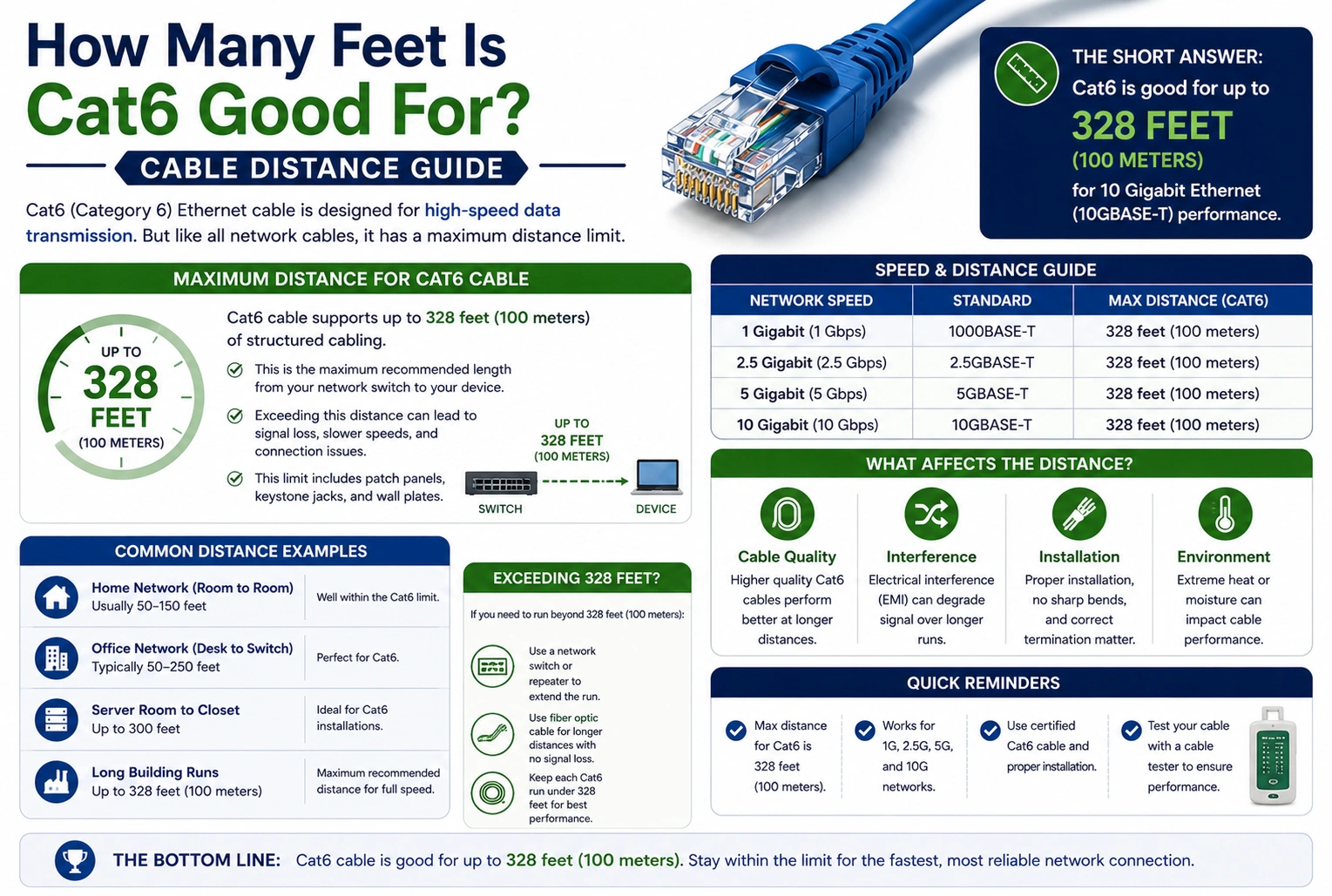
If you’re wondering how many feet is Cat6 good for, the standard maximum cable length is:
328 feet (100 meters)
This distance includes:
- 295 feet (90 meters) of permanent horizontal cable
- 33 feet (10 meters) of patch cables at both ends
Within this limit, Cat6 supports 1 Gigabit Ethernet (1 Gbps) at full performance. It can also support 10 Gigabit Ethernet (10 Gbps) over shorter distances—typically up to 180 feet (55 meters) under standard installation conditions.
Quick Answer
| Network Speed | Maximum Cat6 Distance |
|---|---|
| 1 Gbps | 328 ft (100 m) |
| 10 Gbps | 180 ft (55 m) |
Answer: Cat6 cable is rated for 328 feet (100 meters) for Gigabit Ethernet and up to 180 feet (55 meters) for 10 Gigabit Ethernet.
What Is Cat6 Cable?
Category 6 (Cat6) is an Ethernet cable standard designed for high-speed wired networks.
It is commonly used for:
- Home internet networks
- Offices
- Schools
- Data centers
- Gaming setups
- Security camera systems
Compared to older Cat5e cables, Cat6 offers better performance, reduced interference, and higher bandwidth.
Maximum Cat6 Cable Length
According to Ethernet cabling standards, the maximum channel length for Cat6 is:
- 100 meters
- 328 feet
This includes:
| Cable Type | Maximum Length |
|---|---|
| Horizontal cable | 295 ft (90 m) |
| Patch cables | 33 ft (10 m) |
| Total channel length | 328 ft (100 m) |
Exceeding this distance may reduce network performance and reliability.
Cat6 Speed vs. Distance
Cat6 supports different speeds depending on the cable length.
| Speed | Maximum Recommended Distance |
|---|---|
| 100 Mbps | 328 ft (100 m) |
| 1 Gbps | 328 ft (100 m) |
| 10 Gbps | Up to 180 ft (55 m) |
For longer 10 Gbps runs, many installers choose Cat6a instead.
Why Distance Matters
As Ethernet cable length increases, signal quality gradually decreases.
Longer cable runs may experience:
- Signal attenuation
- Crosstalk
- Electromagnetic interference (EMI)
- Increased latency
- Reduced maximum speeds
Keeping cable runs within recommended limits helps ensure stable and reliable network performance.
Cat6 vs. Cat5e vs. Cat6a
| Cable Type | Maximum Distance | 10 Gbps Support |
|---|---|---|
| Cat5e | 328 ft | Limited (short distances) |
| Cat6 | 328 ft | Up to 180 ft (55 m) |
| Cat6a | 328 ft | 328 ft (100 m) |
Cat6 provides an excellent balance of performance and cost for most home and small business networks.
Real-World Examples
Home Office
A home office located 75 feet from the router can use Cat6 cable to achieve full Gigabit speeds without any issues.
Security Cameras
A security camera installed 200 feet from a network switch can reliably operate over Cat6 using Gigabit Ethernet.
Gaming Setup
A gaming PC connected with a 50-foot Cat6 cable will easily support Gigabit internet and low-latency online gaming.
Office Network
An office with cable runs under 328 feet can deploy Cat6 throughout the building while maintaining Gigabit network performance.
Tips for Long Cable Runs
If your installation approaches the maximum cable length:
- Use high-quality certified Cat6 cable.
- Avoid sharp bends and kinks.
- Keep cables away from power lines.
- Use proper cable management.
- Install network switches or repeaters if longer distances are required.
These practices help preserve signal quality.
Common Mistakes
Exceeding 328 Feet
Running Cat6 beyond the standard maximum length can lead to slower speeds and connection instability.
Assuming 10 Gbps Works at 328 Feet
Standard Cat6 typically supports 10 Gbps only up to about 180 feet (55 meters). For full-distance 10 Gbps, Cat6a is generally recommended.
Mixing Low-Quality Components
Poor-quality connectors, couplers, or patch panels can reduce overall network performance, even if the cable length is within specifications.
Running Alongside Electrical Wiring
Power cables can introduce interference that affects Ethernet performance. Maintain proper separation whenever possible.
Expert Installation Tips
- Keep cable runs below 328 feet (100 meters).
- Use certified Cat6 components for best results.
- Label cables during installation for easier maintenance.
- Test every cable after installation with a network cable tester.
- Consider Cat6a if you plan to use 10 Gbps over longer distances or future-proof your network.
Quick Reference Table
| Ethernet Speed | Maximum Cat6 Distance |
|---|---|
| 100 Mbps | 328 ft |
| 1 Gbps | 328 ft |
| 10 Gbps | 180 ft (55 m) |
9. Frequently Asked Questions
1. How many feet is Cat6 good for?
Cat6 cable is rated for a maximum length of 328 feet (100 meters) for standard Ethernet installations.
2. Can Cat6 support Gigabit Ethernet?
Yes. Cat6 supports 1 Gbps at the full standard distance of 328 feet (100 meters).
3. How far can Cat6 run at 10 Gbps?
Under standard conditions, Cat6 can support 10 Gbps for distances up to approximately 180 feet (55 meters).
4. What happens if Cat6 exceeds 328 feet?
Longer cable runs may experience signal degradation, slower speeds, increased errors, and unstable network connections.
5. Is Cat6 better than Cat5e?
Yes. Cat6 offers higher bandwidth, improved noise resistance, and better support for faster network speeds, especially in environments with electrical interference.
10. Conclusion
If you’re asking how many feet is Cat6 good for, the standard answer is 328 feet (100 meters). Within this maximum channel length, Cat6 reliably supports Gigabit Ethernet (1 Gbps), making it an excellent choice for homes, offices, and commercial networks. For 10 Gigabit Ethernet, Cat6 typically supports runs of up to 180 feet (55 meters) under standard conditions.
By following recommended installation practices, using quality components, and staying within the specified distance limits, you can maximize the performance and reliability of your Cat6 network for years to come.
Discover More Articles
How Many Cubic Feet in a 4×8 Raised Bed? Guide